

How Microsoft Copilot is Transforming Business Productivity
Today, businesses need to reduce manual work, speed up processes and make better decisions. Microsoft Copilot helps by embedding AI into everyday workflows.
What Is Microsoft Copilot for Business?
Microsoft Copilot for business is an AI-powered assistant that helps businesses automate tasks, generate content and deliver Copilot productivity benefits within the tools employees already use every day.
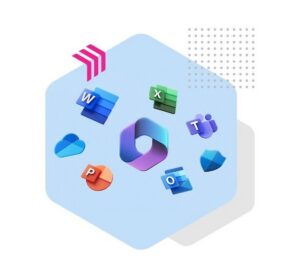
Copilot works across:
- Word
- Excel
- PowerPoint
- Outlook
- Teams
As Microsoft Ireland’s Modern Work Partner of the Year 2026 , Viatel has helped organisations assess, deploy and maximise Microsoft technologies, including Microsoft 365 Copilot.
Explore more about how Microsoft Copilot can fit within your organisation.

Why Are Businesses in Ireland Adopting Microsoft Copilot?
AI business adoption in Ireland is accelerating as organisations look to improve efficiency, productivity and decision-making.
In many cases, this shift is driven by:
- Greater demand for efficiency
- Increased need for automation
- Pressure to improve productivity across teams
As a result, Copilot supports this shift by:
- Reducing time spent on repetitive tasks
- Improving access to data insights
- Creating more consistent ways of working
Learn more about Viatel Technology Group’s modern workplace approach .
What Are the Most Practical Microsoft Copilot Use Cases?
Organisations use Microsoft Copilot for business to automate tasks, streamline processes and surface information faster.
Writing Emails, Reports and Business Content
- Draft Emails in Outlook
- Create documents in Word
- Improve communication speed
Meeting Summaries and Action Points (Microsoft Teams)
- Record and summarise meetings
- Extract action points
- Reduce admin
Data Analysis and Insights in Excel
- Analyse datasets
- Generate insights automatically
- Support faster decision-making
Managing Communication and Workflows
- Summarise email threads
- Prioritise responses
- Automate tasks
Automating Repetitive Tasks Across Teams
- Reduce manual administration
- Improve workflow efficiency
- Free up time for strategic work
Improving Collaboration Across the Modern Workplace
- Real-time updates
- Shared documents
- Integrated communication
Microsoft Copilot Use Cases by Business Function:
Example agents | Expenses Q&A | Accounting Assistant | Employee onboarding |
Dept. | Finance, All Staff | Finance | HR, L&D |
Goal | Cut down on repetitive finance queries that interrupt the Finance Team (mileage claims, approved vendors, reimbursement timelines, etc.). | Support finance leaders in analysing expenditure and identifying cost‑saving opportunities. | Speed up onboarding for new staff and improve retention |
How | Ask the Agent: “What’s the mileage rate..?”, “Where do I upload receipts?” “What’s the approval flow?” The agent returns the exact form, the correct finance policy, and step‑by‑step guidance based on internal documentation — reducing confusion and queue times for finance support. | The agent reviews historical spending data (agency use, transport costs, consumables) and can highlight trends and make suggestions. This supports strategic financial planning and operational decision‑making. | Ask the Agent: “What mandatory training do I need to complete?” “Explain this policy in plain terms” “Translate this into Spanish”
The Agent provides role‑specific training resources, policies, plain‑language and multilingual explanations, all tailored to internal L&D materials. |
Example agents | IT Service Q&A | Scheduling Assistant | Marketing Assistant |
Dept. | IT, All Staff | Operations, management teams | Marketing |
Goal | Reduce the number of tickets logged with the IT department, allowing them to focus on more complex issues. Faster resolution time for end users | Reduce administrative burden of rota management, improve resource utilisation and prevent costly, last‑minute staffing gaps. | Accelerate content creation while maintaining brand consistency across campaigns, social media, blogs and customer communications. |
How | Agent troubleshoots issue with user e.g. Application access, password resets, connecting to a printer, access to a file/folder. Ask the Agent: “How do I reset my password?” “I can't access a shared folder, who can help?” “My VPN connection is not working, how can I fix it?” “How do I report a phishing email?” | Agent troubleshoots issue with user e.g. Application access, password resets, connecting to a printer, access to a file/folder. Ask the Agent: “How do I reset my password?” “I can't access a shared folder, who can help?” “My VPN connection is not working, how can I fix it?” “How do I report a phishing email?” | The Agent uses approved brand guidelines, messaging frameworks, product information and campaign materials to generate and refine content. Prompt the Agent: “Draft a Linkedin post for our upcoming event.” “Summarise this technical solution into customer friendly messaging.” “Generate an image using our brand, logos and messaging.” |
How Copilot Fits into the Wider Microsoft Ecosystem
Microsoft Copilot for business delivers value because it integrates fully into the Microsoft ecosystem.
This includes:
- Microsoft 365 applications
- Devices such as Microsoft Surface
- Collaboration tools
- Security and compliance layers
Because of this, Copilot can:
- Use existing business data
- Maintain governance and security controls
- Deliver consistent outputs across systems
You can explore this further through our Microsoft Teams solutions page.
Copilot Across the Microsoft Environment:
Area | Business Impact |
Microsoft 365 | Reduces manual effort and improves workflow efficiency |
Collaboration tools | Enables better teamwork and hybrid working |
Data environment | Provides real-time visibility and usable insight |
Security layers | Maintains compliance and control |
Copilot also inherits Microsoft’s enterprise-grade security, compliance and data governance controls. This allows organisations to benefit from AI while maintaining oversight of business data and user access.
Learn more about how Viatel helps organisations secure Microsoft environments through our Microsoft Security Solutions.
What Should Businesses Consider Before Implementing Copilot
Successful Microsoft Copilot for business adoption requires a planned approach. Key considerations include:
- Data governance
- Security
- Licensing
- User adoption
In practical terms, this means:
- Ensuring data is structured and accessible
- Confirming permissions and policies are in place
- Identifying high-impact priority areas first
- Planning training and onboarding
We will meet you where you are on your AI journey and build a solution that aligns with your goals, whether that’s phased deployment or full org-wide rollout.
Start with high-value use cases, measure outcomes and expand based on results. Viatel followed this approach through our own Customer Zero programme before supporting customers with Copilot adoption.
Why not watch our webinars on how to build the foundations for AI adoption using Copilot:
- Unlocking Your AI Journey: Session 1
- Unlocking Your AI Journey: Session 2
- Unlocking Your AI Journey: Session 3
How Viatel Uses Copilot Internally: Our Customer Zero Approach
Before helping customers adopt Microsoft Copilot, Viatel embraced the technology within our own business. As Customer Zero, we use Copilot across multiple departments to improve productivity and reduce manual workloads.
Our teams use Copilot to summarise meetings, draft content, analyse information and manage communications. This has given us first-hand experience of AI adoption.
As a result, our experience reinforces the importance of governance, security, user adoption and change management. Successful deployments require more than licences. They need clear objectives, strong foundations and ongoing support.
Using Copilot internally has given us valuable insight into the practical challenges and opportunities organisations face when adopting AI. That experience helps us guide customers with confidence, from initial planning through to long-term optimisation.
Rachel Dempsey, Copilot Technical Solutions Specialist, Viatel Technology Group

How Viatel Supports Microsoft Copilot Adoption
Viatel Technology Group holds Microsoft’s Copilot specialisation , recognising our expertise in helping organisations deploy Copilot securely and effectively. From there, we support organisations through every stage of Copilot adoption.
Strategy and Roadmap
- Identify high-value opportunities
- Align AI with business objectives
- Build a clear adoption plan
Implementation
- Prepare Microsoft 365 environments
- Ensure governance and security readiness
- Integrate Copilot into workflows
During implementation, this involves involves configuring your Microsoft 365 environment so Copilot can securely access the right data.
Training and Onboarding
- Provide role-based training
- Support teams with practical scenarios
- Build confidence in using AI tools
Alongside implementation, Viatel delivers practical, role-based training to help employees adopt Copilot with confidence.
Ongoing Optimisation
- Monitor usage and adoption
- Identify opportunities to scale
- Improve productivity outcomes over time
Watch our video on how we achieved our Copilot specialisation here: Microsoft Copilot Specialisation Achieved | Viatel Technology Group
Ultimately, Microsoft Copilot helps organisations reduce manual work, improve collaboration and unlock more value from Microsoft 365. With the right strategy, governance and user adoption approach, businesses can realise measurable productivity gains while maintaining control of their data and processes.
Next Steps
Talk to Viatel about planning, securing and implementing Copilot in a way that delivers measurable value for your business.
Start the conversation here:
Contact Viatel